Showing posts with label Google. Show all posts

Thursday, November 8, 2012

Google updated november 2012 page rank

Today Google updated page rank. Lots of bloggers and site owners have been waiting from last 3 months for this page rank update. And now it is finally out. Google had its last page rank in august. Google updates page rank in every 3 or 4 months on all the sites and blogs.
Some of the bloggers are not taking the Google page rank seriously in their blogging career. They have a thinking that posting quality content is everything and thereby they never bother about the page rank. Any ways I am always bothered about the page rank because good page rank helps in getting more benefits and impression from others.

What About TECH plus Page Rank ?

Actually this page rank have made me more happier. My blog got page rank 1 in this new page rank update. Page rank 1 may not be a big thing for others. But for me this is very much important because I neither got any rank nor any change on my blog ranking during the last two updates. This time my site went through a small change. So I am truly happy about the November page rank update.

The main reason why i got the page rank 1 is because I had started making  backlinks to my blog from last one month. Before that I hadn't tried to make any backlinks. So I couldn't get any rank in last two updates. So i must try harder to make more backlinks for getting page rank 2 or 3 in the next page rank update.

When Is The Next Page Rank Update?

After any google update, whether it is panda update,penguin update or page rank update, people start wondering about when will the next update be. So now you must be having the same question in your mind. When is the next page rank update?

Google page rank gets updated in every 3 or 4 months. It is based on the backlinks, traffics, quality of the page etc which can help in getting a better page rank. But Google have not announce any particular date of the next page rank update as yet. It will mostly happen after a gap of 3 or 4 months and that will be in the first week of the month.

So the next page rank update will mostly be in the month of Feb 2013. So start making more backlinks from today and post quality content. Here is the video showing what Matt Cutts said about "How the google page rank update works?" . Do watch the video.


Wednesday, November 7, 2012

Google panda 21 update was rolled out on November 5th

Today Google officially announced the panda update, that is google panda 21 update. This update is the 21st update.The update was rolled out on November 05. But google announced through tweets today (Nov 07th). However the update has effected less than 1.1% of English queries.

Google started the panda algorithm changes on Feb 24th 2011 . And now it almost completed 21 regular updates. And also google introduced more new algorithm changes like penguin update,EMD etc.

How Did 21st Panda Update Effect Your Site?

In my case, the last two panda update had a bad effect on my blog. And I tried a lot to recover from the effects. I removed all the low and thin quality content from my blog and posted more quality content. Also, I removed more links from my site.

As a result the new google panda update, that is the panda 21th update, turned out to be a better news for me. It shows that  i recovered from the panda effects. My blog traffic increased from last 4 days.So this panda update had good effects on my blog. What about yours?

If you are under the effects, remove all the thin and low quality content from your blog. And also remove or make your external links to no follow, and post new and quality content. Then wait for next panda update. It might mostly come in the next month.

Sunday, November 4, 2012

Google updated gmail compose to new look

Last week Google gave a new look to their gmail compose. It looks more like google chat. Google is now updating and giving new looks to most of their products. Previously they updated new looks in adsense, anaylatics, google plus etc. This time the change has come on Gmail. But it is not a huge change. Only a particular button named compose is changed.

The new compose is a pop up box. The pop up box is same as the chat box on gmail. But it is bigger than the chat box. However, it is possible to open more than one compose box and send mail to different users with different mail ids like how we chat with more than one person at a time.


The new compose facilitates easy sending of  mails. On typing the email id of the recipients you will see the profile photo of the user as well. And also you can add the cc and bcc recipients. All the options that were available in the old compose are also available in the new look.

You can see the changes while replying to a mail as well. The replying is better than the old one. It looks more like a simple comment box. The old one had bigger boxes compared to the new one.

Google introduced this pop up compose now for testing. Hence it will be accompanied with more additional features in coming days. They said emoticons, event invitations, print drafts from the more menu, labels, canned responses, send read receipts are the upcoming features that google is going to add.

If you are now using the new compose and if you want to go back to the old compose, just click the more button on the new compose box where you will see an option "Switch back to old compose". Click on that. It will automatically get redirected to the old compose style.

Saturday, October 20, 2012

What are bad ads? Google fighting against bad ads

Today google tweeted an infographic of how they are fighting against bad ads. Google informed about bad ads and the reasons why they are cleaning the bad ads At present there are millions of people using web and almost all of them are getting to their desired sites by clicking ads. For example if we are searching "I am hungry" you will get some food based ads on the google search.By clicking the advertisement people will get the exact solution for it. If these ads get you to some other sites, people will be discouraged to use web and ad links. So for avoiding this google is cleaning the bad ads from the web.

What Are Bad Ads ?

Bad ads are nothing but some scam selling illegal products, such as counterfeit goods, and harmful products such as malware and spyware. This is what google said about bad ads through infographic.

How Google Locates Bad Ads ?

Google have hundreds of engineers and policy experts for finding bad ads and stopping them. Google normally finds the bad ads using three approaches.

1. Automated Systems 

The automated system scans the advertisers website before showing the ads. If the automated system discovers the website as scam or if it is categorized under bad ads, the advertisers and ads will be banned from the web.

2. Expert Review 

Google experts are directly reviewing suspicious ads informing that the ads are flagged. Then they stop showing the ads and ban the advertisers.

3. Your Help 

This is an option for us. If we find any bad ads on the web, we can send a mail to google reporting about the bad ads. And google will take the required actions.

What Google Do After Finding Bad Ads?

If google finds any bad ads on the web, they completely stop showing the ads and they also remove the advertisers. In 2011 Google banned almost 824,000 bad advertisers and more than 134 million bad ads from the web.

And Google is continuing its fight against bad ads for better services for their valuable users. And Google's ad policies are designed with safety and trust.

Monday, October 15, 2012

How to file a complaint on google DMCA if your content is copied

Many bloggers especially the beginners copy the content from other sites and paste them on their blogs. The posts from my blog too were copied by other bloggers. This is the reason why i m writing this post. Today i filed a complaint to the Google DMCA for the same reason and for removing links from the Google search result. This service provided by Google is very beneficial for the real owners of a site because we know how difficult it is to make a blog post. And it is frustrating to see others  copying the content and decreasing our traffics. This is not real blogging. So just avoid copying others content and their hard work and skills.

It may happen to your blog post as well. So you can check this from several sites or else even manually from Google  If you find any site with your content copied and pasted on it, then you can file a complaint to google DMCA. Google will remove the post link of those who copied your content from the google search result. And your blog traffics will come back to you.


How To Start On Google DMCA 

If you see any of your posts being copied and if you are the copyrighted owner, then you can file a complaint on Google DMCA.

Go to google DMCA and select the product you are using. This post is for bloggers who wants to file a complaint about their blog. So such bloggers need to select the product as blogger/blogspot.

After selecting blogger/blogspot, a new option will be displayed under that for specifying the nature of your request. Among that, select "I have found content that may violate my copyright".

Then mention that you are the copyright owner by clicking "Yes". Then again select   "Yes" to proceed forward. Next select "text". Then you will see a form link at the end of the instructions. Click on "this form". And it it will open a new page of the form.

How To Fill The Form 

It is important to read the information given on the form page before filling the form. The following steps will help you to start with the form.

1#. First write your contact information by writing your first name and last name.

2#. Enter your company name in the second column. This is not compulsory. If you don't have a company name, you can leave it blank

3#. The third column is for full legal name of the copyright holder. If you are the copy righter owner write your name.

4#. The fourth column represents your contact email address and the next column is for selecting your country.


Your copyrighted work 

In your copyrighted work section you will see three columns. Firstly, it is "where can we see authorized example of the work?". Enter your  copyrighted  post link in this column.

Secondly, it is the "Identify and describe the copyrighted works" column. Describe your work. For example, copy some lines of your copyrighted post and paste it to this column.

  Thirdly, there is a column for posting the location of allegedly infringing material. This talks about where you have seen your copyrighted content other than your blog. Copy the post link and paste it to the column.

Then last steps are sworn statements. check the two boxes and then make a signature. Signature is nothing but your first name and last name. Then submit for processing request.


Thursday, October 11, 2012

Major Google algorithm changes happened in October and September 2012

October and September 2012 were the months of Google algorithm changes. There were almost 5 Google major algorithm changes which happened in these two months. And Google hit many sites from the search queries. The algorithm changes are making more clean and better Google search results. But it is also disappointing some bloggers and site owners.

Actually, there are mainly 2 major updates in Google algorithm updates, one is panda update and the other is penguin updates. Panda update is the monthly update. So all the bloggers and site owners try their best to escape from the panda effects. Penguin update is almost same as panda update. Most of the bloggers and site owners know the  approximate date of the panda update. So they always prepare their sites for that. But the months of October and September also witnessed a few other unexpected algorithm changes. All the updates are major ones. What are the five updates? Read the following to know about them.

Google Panda 3.9.2 

This is the monthly regular panda update. The update was rolled out on September 18th. It was officially announced by Google through twitter. And the update effected less than 0.7% of the search queries.

Google Exact Match Domain (EMD) Update

This is one of the major updates that happened on September 29th.The EMD effects those sites having domain name similar to any popular domains,and sites with same keywords and low quality content will also be effected by EMD upadate. This EMD update algorithm change effected 0.6% of English queries.


Google Panda 20 

Google changed algorithm Google panda 20 on September 27th. This was the second panda update in the month of September. And the algorithm changes effected 2.4% of the English queries and 0.5% on other languages.

Google Penguin 3 Update 

We bloggers waited for long for penguin 3 updates . And it was updated on October 5th. This is a major update from Google  And this is the third update of penguin. Matt Cutts had posted about the algorithm changes on October 5th. The penguin 3 update effected 0.3% search queries.

Google Page Layout Algorithm 

Google's first page layout algorithm was released on January 2012. The page layout algorithm effected more number of ads appearing on the top of a page and also on the visible parts of the landing page. The update was announced by Matt Cutts through twitter. It effected 0.7% of search queries.

These are the updates which has happened in the months of October and September  And we can expect more updates to happen in the coming days. So just concentrate on all the coming updates and recover from all the effects.

Tuesday, October 9, 2012

Adsense for feed is going away, what to do next?

This is a big bad news for all adsense account holders and mostly bloggers. Last week Google announced about the stopping of ads in feeds services. And today it is shown in all the blogger blogs earnings tab. Google says that the adsense for feed service will stop from December 3rd, and only up to then you can use this service. So this is a big disappointment for all the ad publishers.

Most of them are trying to make more feed subscribers for attracting more readers and revenue. And most of the bloggers are getting more adsense ad click from the feeds.So stopping the adsense for feed will decrease the adsnese earning of the publishers. And already many publishers have reacted to this declaration made by Google.

What Will Happen Till December 3 ?

The existing adsense feed users will not face any changes till December 3.. The ads will be shown on feeds up to December 3. Also, you will get all the earnings earned by you up to December 3. So you don't have to remove your adsense for feed services now. It will automatically stop showing the ads on your feed from December 3 and you will get all your earnings.

You cannot start utilizing this service if you are not using adsense for feed product currently because it stopped on October 2nd itself. Moreover, the adsense for feed services is removed from the my ads tab on the Google adsnese account.

And obviously nothing will happen to your other adsense product, if you are following the adesnse policies.

Adsense Alternatives For Feed Monetization 

So Google adsnes for feed will be stopped soon. But, does that mean that there is no other way to monetize your feed? No, you can monetize your feed with other alternatives. Already there are many services to monetize your feed. So you can use any of them and you can make money the same way how you make from the adsnese. Following are the some of the RSS feed monetizing serving websites.

1#. Kanoodle

2#. Pheedo

3#.Text Link ads

4#. Feed show

5#. Adgenta

6#. Media fed

Saturday, October 6, 2012

Google penguin update 3.0 released on October 5 th 2012


From last month, all bloggers and website owners have been waiting for the new penguin 3 update. And finally yesterday Matt Cutts tweeted about the confirmation of Google penguin 3 update. The new penguin 3 update have effected 0.3% of English queries.

Penguin update is the most important algorithm change of Google because penguin updates mostly effects the spam websites, and the effected sites are completely removed from the Google search result. This will decrease the traffics of such sites.


Google has now released almost 3 penguin updates. This is the latest  penguin update. There were many rumors about this update. So most of the bloggers are giving more importance to this new penguin update. Google's first penguin update was on April 2012 which effected almost 3.1% of English queries and the second update released on May 2012 was penguin 1.1. And now the third update in October 2012 is called 1.2 or 3.0. It effected only 0.3% of the search queries.


This week is considered very bad for all bloggers and website owners because this week provided three algorithm updates. One of them was the EMD(exact matching domain) update followed by the panda 20 update. And now the penguin update is released. So this week is truly bad for bloggers and site owners. Form these update we know how much importance Google gives to the search results. Google strives against the spam and low quality sites in order to give better search results for the users. So we bloggers must follow the terms and conditions strictly to recover or over come all these Google algorithm change effects.

Wednesday, September 19, 2012

Google panda refreshed on 18th September 2012


Google panda updated on 18th September 2012. Yesterday Google tweeted the news about this updation. But last week many of the bloggers were informed about the refresh of google panda 3.9.2 or 4.0.  Also few days back Matt Cutts had also tweeted about the panda refresh. So most of the bloggers either thought google panda is refreshed or thought it was a rumor. Anyways yesterday google officially announced the news through tweeter.

From this we can understand how important is google panda and google algorithm changes in the minds of the bloggers. Last month google hit 1% of  search result and this time it is reduced to 0.7%. But all upadates are important for bloggers and site owners because some will be waiting for the recovery of their last effects and some will be waiting to know if they are affected now.


In my case, the new panda refresh is actually beneficial for my blog. Last time my blog was hit by the panda effects, and my blog traffics were decreased by about 25%. So i worked hard to recover from the panda effects. And now i got good results from the new update. My blog traffic is increased  upto 70% and I am so happy about it. And obviously my adsnese earnings also increased.

So if any one is hit by the google panda on the new or previous update, you must follow the google webmaster guidelines and try hard to  recover from the panda effects. Do wait for the next panda refresh. Other wise you will be hit by the upcoming google penguin effects also. It is more dangerous than panda effects. So take blogging career as seriously as possible and do the best seo.

Read This also :

Google panda and penguin effects checking tool

# What is to be done after the effects of Google panda

Thursday, August 23, 2012

Google panda 3.9.1 updated on august 20th 2012


After a month's waiting, Google has finally announced the august month's panda update which is panda 3.9.1. The panda 3.9.1 was updated last Monday that is on 20th august 2012. Google twitted the updated news today.

Google stated that this is a minor panda refresh and that this only effected 1% of the search result. The next update is google penguin update which might have more effects and also, it might kick out more spam websites and blogs from the search result. So again bloggers and website owners have their minds filled with tension and anxiety for the next penguin update.


Actually I am happy about the new panda update, because my blog traffics has increased after the new panda 3.9.1 update. But still I am scared about the second penguin update. All we can do is wait for the penguin update. Anyways people must follow the Google's  terms and conditions and thereby never make your blogs and website a spam.

Friday, August 10, 2012

London Olympics 14th day Google doodle soccer or football

This is the 4th animated doodle from Google. Soccer Google doodle. Here is the Google doodle for today's Olympics event which is soccer. It is amazing. Actually soccer is same as football. Football is the official name for soccer. The name soccer is derived from some western country. However, there is no difference between the two games. And today Google has updated the name as soccer doodle.

How to play it on Google doodle?

go to Google home page to see the new Google doodle. Click on play to start the game. We get to play as the goal keeper. There is an opposite player who will try to make goals with five balls provided. It is very easy to play . Use the right and left side keys to navigate the goal keeper towards the right and left respectively which will also help you to stop the ball from entering the goal post. Use the space bar to jump when the ball is kicked higher. There is no time limit for this game. But you will get a maximum of 3 chances. If you let the opposite player to make 3 goals then the game will end. Play and try to make the maximum points.


The London Olympics is ending on August 12th so Google will be updating two more doodle for Olympics. Let us wait for the next awesome Google doodle. 

Thursday, August 9, 2012

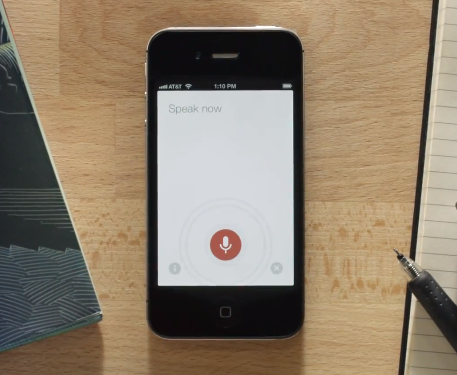
Google enhanced voice search now available only on android.


Google enhanced voice search on the Google apps. Its is very similar to siri. This enhanced voice search is now available only on android. And obviously it will be coming soon on ios. So now we can say siri  is now on android because the Google enhanced voice search and siri are alike. But it is not a replacement for siri, this is only Google voice search. Anyways this is very useful for android users and also ios users.

The Google enhanced voice search is working on the Google app on the android. Just go to Google search app on your android. And select voice search by clicking on the micro phone icon on Google search and speak or say what you want to search. Google will give the search result by voice and also they will show the result on your browser. You can ask any type of questions including for images videos,etc. So now there is no need to type on Google search . Because it is possible by speaking.

Google is trying to provide more services to its users. Now Google is not just a search engine. Its completely an encyclopedia or even more than that. So take this enhanced voice search as your new searching mode. If you want to download this Google search app on your android just click here


London Olympics 13th day Google doodle Slalom Canoe.

I have been posting about the Google doodle from last two days continuously and today is the 13th day of Olympics and my third post of Google doodle. Today  Google has come up with another doodle for an event called Slalom Canoe. Day bay day Google is updating better doodles. So people always have good time with Google.

Today Google doodle is about Slalom Canoe. Slalom Canoe is another event happening in Olympics today. The main aim of this sport is to navigate the canoe through the two poles which are generally red or green. The competitor should reach the goal in the shortest time to win.

How to play it on Google?

Go to Google home page where you will find your new Google doodle. click play. When you are all set to start, press the left and right arrow keys on your keyboard to increase the speed as well as to direct the canoe in the right direction. Pass the canoe through the two poles in order to fetch more points or stars. Try to complete it as fast as possible. You will also observe the cracks appearing on the canoe when you hit or pass by a rock.


Everyday Google is coming up with new doodle and is also making it more difficult day by day. Let us wait and see what Google has for us tomorrow.

Wednesday, August 8, 2012

Google doodle basketball- Another awesome Google doodle

Yesterday Google had updated an amazing doodle as Google hurdles. And today Google has again come up with yet another brilliant doodle, that is Google doodle basketball. People had been waiting for today's Google doodle after seeing yesterday's astonishing doodle for the event hurdles. Today's Olympic special event is basketball. So Google have made their doodle for basketball. Go to Google home page and start playing the Olympic basketball at home.


The basket ball doodle is again an animated doodle that works as per the user's commands. All you need to do is press the play button on the Google basketball doodle. On commencement of the game, press space button on your computer keyboard twice.

Do analyze the time gap required between the two spaces. Only then the ball fall correctly into the basket. You will also find that the player moves backward after putting some baskets which will increase the time gap required between the two spaces. You will get 24 seconds time to play and make maximum baskets. The point is based on the number of balls that you put inside the basket with in 24 seconds. And you will get your medal based on the points.


Actually today's doodle is a little difficult than yesterday's. So try again and again to make the maximum baskets possible. And wait for tomorrows update.

Tuesday, August 7, 2012

London Olympics 2012- Google doodle for hurdles. Its just amazing

From the starting day of London Olympic 2012 Google is trying and putting up new and amazing doodles on Google home page. All doodles are related to the sports events happening in the London Olympics on the particular day. Today (7/8/12)  Olympic special event is hurdles. So Google has also added an amazing animated doodle. Its absolutely jaw-dropping. So from this we can say Google is completely supporting London Olympics and they are also making us a part of the great London Olympics through Google search.

Google had already added a service through a special page for users which gives full details of London Olympics. It provides a time report of everything that happens on Olympics 2012. So people can easily check the medal status from Google Olympic special page itself. These are the ways by which Google is showing its support towards the London Olympics each day.


Todays Google doodle is for a special event called hurdles. Its not just a doodle, but an animated doodle. The doodle works with your helps. Just press the play button and press the left and right side arrow on your keyboard continuously. This will consequently make the man run faster. As and when the man reaches the hurdles press the space button so as to make the man jump over the hurdles. And the finishing point, you will get your medal with your points. Just go to Google and start playing hurdles. Its wonderful. And wait for the coming days to see other great doodles from Google.  

Thursday, August 2, 2012

Google page rank updated August 2012


Google page rank is updated today 02 August 2012. All bloggers were waiting for this day to know the change made by their blog. Some of the blogs have increased their page rank while some others decreased.

The page  rank algorithm is based on the quality backlinks. You will get a page rank, on the number of backlinks. Higher the number of links to your blog, better will be your page rank. But actually backlinks is not the only reason behind the changes on the page rank.

 You must also have good traffics and quality content on your blog. Some   of the bloggers are hardly trying to get more backlinks and to post good quality content. The page rank is calculated in every 3 months. The last page rank was published in May 2012.

In my case, I got a disappointing result from the current page rank update. My blog page rank is not increased. I had tried to make more backlinks but the result is bad. So I need to wait for another 90 days. I think the main reason behind this let-down is the change that   was made in my site domain. This is a new domain which is why this has happened.

So I will have to try to make more backlinks and have regular posting on my site over again. However, I would like to state same tips to who have increased their page rank and also to who have decreased their page rank. That is, try to post quality content and make more backlinks. And do comments mentioning your current page rank.


Related article 

Saturday, July 28, 2012

Google introducing a special page for Olympics 2012


Google introduces a special page for London Olympics 2012. Now people can get any news feature and score board from google Olympic page. This has a huge impact on all news sites. So people prefer using this google channel instead of searching for any other sites for the Olympic news. Just enter directly to Google Olympic where you will be made available with all news of Olympics.

Google launched this new page in Google plus. " The Olympic Game"  as well as a separate search for medals, hot Olympic game search. Also, all google plus page updates are shown on this special page. In totality, it is an awesome Olympic page.

Google launched this page for all Olympic lovers wanting the Olympics news faster. Especially during traveling time or working hours, people can visit this page and check the details. The time is scheduled according to the country base, People visiting the page from India will be shown the Indian standard time zone. This way people can easily understand the event time correctly.  

Friday, July 27, 2012

Hand write search with Google. How to active Google handwrite search.


Google had started their first search mode through keyword type and at present everyone are using this search mode in google. And later google introduced another search mode which was the voice search mode. But only few users use it. And now Google introduces a new search mode"Handwrite search". this search technique is available for android and ios users. That is. this facility is accessible to those using android or ios operating system working mobile phones or tablets.

What is Handwrite search?

Handwrite search mode is a new Google search option for android and ios users. If we open Google.com in our android or ios mobile phone or tablet. This new service enables you to search from google with your finger at any point where you can write. It will automatically convert your writing into words and google will search for those words and give proper result. This is a good and useful search mode for users.


How to activate?

Go to your android or ios browser and browse for google.com .On the google page you will find settings. Select the settings which will open a new page. There you can see an option "Handwrite?". Enable the option and save the settings.


Google calculator: Google launches a virtual calculator for google users.


In order to gain information about anything the first source that comes in everyone's minds is Google . Google provides information regarding anything and everything. In short, it has the best solution for every search. That's why google is said to be one of the best search engine in the world.

Google maintains their utility every time and they give and valuable information to their users. And now Google introduces anther worthful service which is the " Google calculator". Previously google had an online calculator service, but this is the first time they are showing a good scientific calculator on google search result itself. People neither wants to enter any particular sites to find a calculator nor do they want to open calculator from their computers. For all such people this is the shortcut. Just go to the Google page and type "Calculator". It will show a beautiful calculator as your search result.

Earlier google had offered an online calculator. for instance, if we type 5*3 in the google search box, then google will give the correct result.
The new calculator has almost every mathematical functions including sin,cos,tan,log,square root,percentage etc. So we can call it as Google scientific calculator.

Thursday, July 26, 2012

Google talk (gtalk) suddenly stopped today 26 July at 4:20pm

Gmail chat and Google chat software Gtalk stopped function all over the world today. Users had complained that they couldn't Login to gtalk through twitter and some other social networking sites.
It happened at approximately Indian time 4:20pm. Google gives details of the problem. And they accepts their mistakes as well.

Moreover, google announced through their official status  post that they will resolve the problem with in an hour and that they are studying about the serious of problem.

But google couldn't resolve the problems by 5:20pm. Thereby they posted a new status in their official status post, stating that they are trying to resolve this problem and with in 1 hour they will post a new update.

And the problem was solved at 8:55pm. Now people can use Gtalk and Gmail. But google had not yet disclosed the reason behind the breakdown.


Related Posts Plugin for WordPress, Blogger...

ShareThis

Twitter Delicious Facebook Digg Stumbleupon Favorites More